Arrays are the most versatile data structure in JavaScript. Beyond simple indexing, modern JavaScript provides higher-order functional methods and specialized loop constructs.
To write bug-free code under interview conditions, you must master three dimensions of array manipulation:
- Mutability Boundaries (
slice()vssplice()) - Transformation & Aggregation (
map(),filter(),reduce()) - Loop Intent & The Async Trap (
for...invsfor...ofvsforEach)
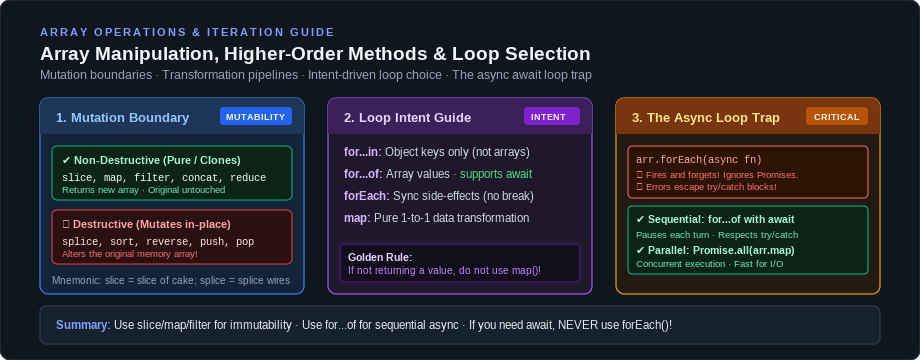
1. slice() vs. splice() & Mutability
slice(start, end) — Non-Destructive Copy
Returns a shallow copy of a portion of an array into a new array. The end index is excluded, and the original array remains completely unaltered.
splice(start, deleteCount, ...itemsToAdd) — Destructive Editing
Modifies the original array directly in memory. Can delete elements, insert new elements, or replace existing ones.
const nums = [10, 20, 30, 40, 50];

// 1. slice() - Non-destructive shallow copy (start, end non-inclusive)
console.log(nums.slice(1, 3)); // [20, 30]
console.log(nums.slice(2));    // [30, 40, 50]
console.log(nums.slice());     // Full shallow copy: [10, 20, 30, 40, 50]
console.log(nums);             // [10, 20, 30, 40, 50] (Original untouched!)

// 2. splice() - Destructive editing (start, deleteCount, ...itemsToAdd)
const arr = [10, 20, 30, 40, 50];
const removed = arr.splice(1, 2); // Removes 2 elements starting at index 1
console.log(removed); // [20, 30]
console.log(arr);     // [10, 40, 50] (Original mutated!)

// Insert with splice (deleteCount = 0)
const insertArr = [1, 4, 5];
insertArr.splice(1, 0, 2, 3);
console.log(insertArr); // [1, 2, 3, 4, 5]

// Replace with splice
const replaceArr = [1, 2, 3, 4];
replaceArr.splice(1, 2, 99, 100);
console.log(replaceArr); // [1, 99, 100, 4]2. Searching, Filtering & The reduce() Multi-Tool
JavaScript provides specialized search and aggregation methods:
find()&findLast(): Returns the first / last matching item (orundefined).findIndex()&findLastIndex(): Returns the first / last matching index (or-1).filter(): Returns a new array with all items matching a predicate.map(): Creates a new array by applying a 1-to-1 transformation function.reduce(fn, initial): The ultimate array multi-tool that aggregates an array into any single value (number, string, frequency object, or flattened array).
const users = [
  { id: 1, name: "Ahmed", role: "user" },
  { id: 2, name: "Sara", role: "admin" },
  { id: 3, name: "Ahmed", role: "editor" }
];

// Searching: find vs findLast vs findIndex
console.log(users.find(u => u.name === "Ahmed"));     // { id: 1, name: "Ahmed" }
console.log(users.findLast(u => u.name === "Ahmed")); // { id: 3, name: "Ahmed" }
console.log(users.findIndex(u => u.name === "Sara")); // 1

// Filtering & Mapping
const numbers = [10, 25, 40, 55, 60];
console.log(numbers.filter(n => n > 40)); // [55, 60]
console.log(numbers.map(n => n * 2));     // [20, 50, 80, 110, 120]

// reduce() Multi-Tool Patterns:
// Pattern 1: Sum
const sum = [1, 2, 3, 4].reduce((total, n) => total + n, 0); // 10

// Pattern 2: Frequency Counter
const letters = ["a", "b", "a", "c", "b", "a"];
const freq = letters.reduce((table, ch) => {
  table[ch] = (table[ch] || 0) + 1;
  return table;
}, {}); // { a: 3, b: 2, c: 1 }

// Pattern 3: Cart Total
const cart = [{ price: 10 }, { price: 2 }, { price: 25 }];
const total = cart.reduce((acc, item) => acc + item.price, 0); // 373. Sorting & Condition Checking
By default, .sort() converts array elements into strings and sorts them according to UTF-16 code units. This produces severe bugs with numbers:
[100, 5, 20].sort() results in [100, 20, 5] because "100" comes before "20" alphabetically!
// Sorting Pitfall: default sort converts to strings!
const numbers = [100, 5, 20];
console.log([...numbers].sort()); // ❌ [100, 20, 5] (Alphabetical order!)

// Correct numerical sort with comparator:
console.log([...numbers].sort((a, b) => a - b)); // ✔ [5, 20, 100] (Ascending)
console.log([...numbers].sort((a, b) => b - a)); // ✔ [100, 20, 5] (Descending)

// Condition Checking: some() vs every()
const ages = [12, 17, 19];
console.log(ages.some(a => a >= 18));  // true (At least one adult)
console.log(ages.every(a => a >= 18)); // false (Not all are adults)4. Loop Selection: for...in vs. for...of vs. forEach vs. map
Choose your loop by intent:
for...in: Loops over object keys (property names). Never use on arrays (traverses prototype properties and yields string indices).for...of: Best general loop for arrays and iterables. Respects order, supportsbreak/continue, and supportsawait.forEach: Designed strictly for synchronous side-effects (logging, emitting events). Cannot usebreakorcontinue.map: Pure 1-to-1 data transformation. If you are not returning a new array, do not use map!
const items = ["a", "b", "c"];
const user = { name: "Omar", age: 30 };

// 1. for...in -> Objects ONLY (traverses keys/property names)
for (const key in user) {
  console.log(key, user[key]); // "name Omar", "age 30"
}

// 2. for...of -> Iterables/Arrays (iterates values + allows break/continue)
for (const item of items) {
  if (item === "b") break; // ✔ Clean early exit!
  console.log(item); // "a"
}

// 3. forEach -> Sync side-effects (cannot break or continue)
items.forEach(item => {
  // if (item === "b") break; // ❌ SyntaxError: Illegal break statement
  console.log(item);
});

// 4. map -> Pure 1:1 transformation (always returns new array)
const upper = items.map(x => x.toUpperCase()); // ["A", "B", "C"]5. The Async Pitfall: Why await Fails Inside forEach()
This is one of the most common asynchronous bugs in modern JavaScript.
forEach is completely synchronous. It invokes your callback, ignores its return value (including returned Promises), and immediately moves to the next iteration without waiting. An await inside a forEach callback is effectively invisible to the outer code.
const delay = ms => new Promise(r => setTimeout(r, ms));
const items = [1, 2, 3];

// ❌ THE BUG: forEach ignores Promises returned by async callbacks!
async function badLoop() {
  console.log("Start");
  items.forEach(async n => {
    await delay(100);
    console.log("Item:", n);
  });
  console.log("End"); // Runs immediately before any items!
}
// Output: "Start" -> "End" -> (items log later out of sequence)

// ✔ SOLUTION 1: for...of for sequential async execution
async function sequentialLoop() {
  console.log("Start");
  for (const n of items) {
    await delay(100); // Pauses each iteration properly!
    console.log("Item:", n);
  }
  console.log("End"); // Guaranteed to run after all items finish!
}

// ✔ SOLUTION 2: Promise.all for parallel concurrent execution
async function parallelLoop() {
  await Promise.all(items.map(async n => {
    await delay(100);
    console.log("Item:", n);
  }));
  console.log("All done in parallel!");
}Loop Type | Primary Target | Returns Value? | Supports break / continue? | Supports async / await? |
|---|---|---|---|---|
for...in | Objects (keys) | No | Yes | Yes |
for...of | Arrays & Iterables (values) | No | Yes | Yes (Sequential pause) |
forEach | Arrays (side-effects) | No (undefined) | No | No (Fires & forgets!) |
map | Arrays (transformation) | Yes (New array) | No | No (Use Promise.all) |
Think it throughActivity 1: What is logged to the console, and did the original array change?
const list = [1, 2, 3, 4];
const a = list.slice(1, 3);
const b = list.splice(1, 2);
console.log(a, b, list);
Output:
a = [2, 3]
b = [2, 3]
list = [1, 4]
Explanation:
list.slice(1, 3)extracts index 1 up to index 3 (exclusive) into a new array[2, 3], leavinglistuntouched.list.splice(1, 2)removes 2 items starting from index 1 ([2, 3]), mutatinglistin-place solistbecomes[1, 4].
Think it throughActivity 2: Predict the exact console output order of this async snippet:
console.log('1');
[10, 20].forEach(async n => {
  await new Promise(r => setTimeout(r, 50));
  console.log('Item:', n);
});
console.log('2');
Output Order:
1
2
Item: 10
Item: 20
Why?
forEach is synchronous. It invokes the async callback for 10 and 20, ignores their returned promises, and immediately continues to execute console.log('2'). Only after the synchronous stack clears and the timer callbacks resolve on the Event Loop do the items log!