In JavaScript, the this keyword is not determined by where a function is written—it is determined by how the function is called at runtime. When methods are extracted or passed into callbacks, their execution context is often detached and lost.
To command this explicitly, JavaScript provides three built-in Function.prototype methods:
- 🔹
call() - 🔹
apply() - 🔹
bind()
Why Controlling this Matters
When you assign an object method to a variable or pass it as a callback, this loses its binding to the original object:
const user = {
  name: "Ali",
  greet() {
    console.log(this.name);
  }
};

const sayHello = user.greet;
sayHello(); // ❌ Output: undefined (this is lost!)1. call() – Invoke Immediately with this
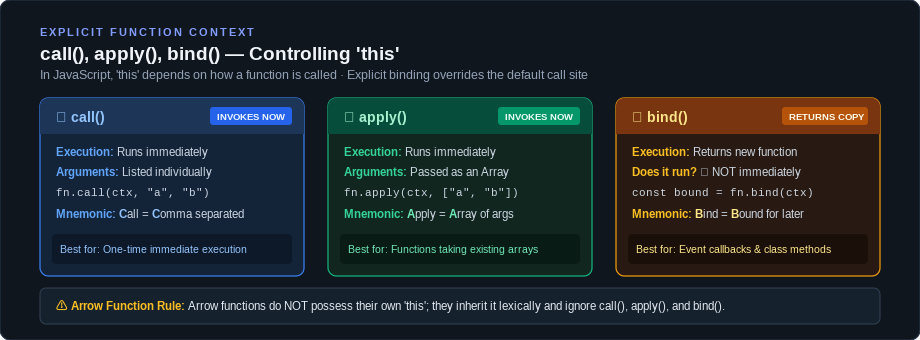
call() invokes the function immediately and explicitly sets this to the provided object. Additional arguments are passed individually as a comma-separated list.
Syntax
fn.call(thisValue, arg1, arg2, ...);2. apply() – Arguments as an Array
apply() is identical to call(), except that arguments are packed inside an array.
Syntax
fn.apply(thisValue, [arg1, arg2, ...]);function greet(greeting, punctuation) {
console.log(`${greeting}, ${this.name}${punctuation}`);
}
const user = { name: "Sara" };
// 1. call() - Arguments listed individually
greet.call(user, "Hello", "!"); // Output: "Hello, Sara!"
// 2. apply() - Arguments packed in an array
greet.apply(user, ["Hi", "..."]); // Output: "Hi, Sara..."3. bind() – Lock this for Later
Unlike call() and apply(), bind() does NOT execute the function immediately. Instead, it returns a brand-new copy of the function with this permanently locked to the provided context.
Syntax
const boundFn = fn.bind(thisValue, arg1, arg2, ...);function greet(greeting) {
console.log(`${greeting}, ${this.name}`);
}
const user = { name: "Sara" };
// bind() returns a new function with 'this' permanently locked
const boundGreet = greet.bind(user, "Hello");
boundGreet(); // Output: "Hello, Sara"
// Real-World Pattern: Preserving 'this' in Class Event Handlers
class Counter {
constructor() {
this.count = 0;
// Lock 'this' to the instance so callbacks don't break
this.inc = this.inc.bind(this);
}
inc() {
this.count++;
console.log(this.count);
}
}Method | Execution Timing | Arguments Format | Return Value | Primary Use Case |
|---|---|---|---|---|
call() | Executes immediately | Comma-separated list (arg1, arg2) | Result of function call | One-time immediate call with custom context |
apply() | Executes immediately | Single array of args ([arg1, arg2]) | Result of function call | Invoking functions with pre-existing argument arrays |
bind() | Does NOT execute now | Comma-separated list (arg1, arg2) | New bound function copy | Event handlers, callbacks, and partial function application |
Think it throughInterview Question: What does this print, and why?
const person = {
  name: "Alex",
  greet: () => {
    console.log(this.name);
  }
};
person.greet.call({ name: "Jordan" });
Output: undefined (or global name in browsers)
Why?
greet is an arrow function. Arrow functions have no execution-context this of their own—they capture this lexically from their parent scope (here, the outer/global scope). Calling .call(), .apply(), or .bind() on an arrow function is silently ignored and will not alter its context.