While Promises solved callback hell, chained .then() and .catch() callbacks can still feel unnatural to read, mentally reverse control flow, and make step-by-step debugging cumbersome.
ECMAScript 2017 introduced async / await as syntax sugar built entirely on top of Promises. It allows developers to structure asynchronous logic using linear, top-to-bottom syntax that reads like synchronous code while preserving non-blocking performance:
$$\text{Promises = The Engine} \qquad \longleftrightarrow \qquad \text{async / await = The Steering Wheel}$$
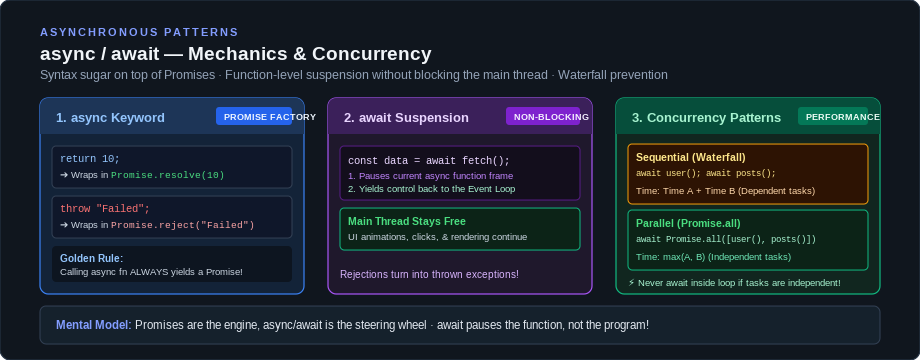
1. The async Keyword & Automatic Promise Wrapping
Adding async before a function declaration, expression, or arrow function transforms it into a Promise factory with two fundamental rules:
- Always Returns a Promise: If you return a primitive value or an object, JavaScript automatically wraps it with
Promise.resolve(value). - Passes Existing Promises Through: If you return a Promise explicitly, JavaScript does not wrap it twice; it returns the Promise as-is.
- Thrown Errors Become Rejections: If an exception is thrown inside an
asyncfunction, it is converted intoPromise.reject(error).
// 1. Implicit Promise wrapping of primitive returns
async function getScore() {
  return 100; // Automatically equivalent to: return Promise.resolve(100);
}

// Consuming via .then() confirms it returns a Promise
getScore().then(val => console.log("Score:", val)); // "Score: 100"

// 2. Thrown errors become rejected Promises automatically
async function failTask() {
  throw new Error("Database timeout"); // Equivalent to: return Promise.reject(new Error(...))
}

failTask().catch(err => console.error("Rejected:", err.message)); // "Rejected: Database timeout"2. The await Keyword & Non-Blocking Suspension
The await keyword can only be used inside async functions (or at top-level modules). It pauses execution until the awaited Promise settles:
- If the Promise fulfills,
awaitunwraps and extracts the resolved value directly into your variable. - If the Promise rejects,
awaitthrows the rejection reason as an exception.
Why await Does NOT Freeze the Browser
Beginners often fear that pausing code blocks the entire program. However, await only yields control back to the JavaScript event loop. While the async function waits, the engine continues processing UI user clicks, rendering animations, and handling other I/O operations.
const delay = (ms) => new Promise(resolve => setTimeout(resolve, ms));

async function loadDashboard() {
  console.log("2. Starting dashboard fetch...");
  await delay(100); // Suspends loadDashboard, returns control to the event loop
  console.log("4. Dashboard data ready!");
}

console.log("1. Script starts");
loadDashboard();
console.log("3. Main thread continues immediately");

// Console Output:
// 1. Script starts
// 2. Starting dashboard fetch...
// 3. Main thread continues immediately
// 4. Dashboard data ready!3. Sequential vs. Parallel Execution (Waterfall Prevention)
One of the most dangerous performance antipatterns in modern JavaScript is the accidental async waterfall:
- Sequential Execution: Awaiting calls one after another when they don't depend on each other. If Call A takes 300ms and Call B takes 300ms, total latency is 600ms.
- Parallel Execution: Starting both asynchronous operations concurrently before awaiting them together using
Promise.all(). Total latency is only 300ms (the longest single request).
async function fetchUser() { /* takes 200ms */ return { id: 1, name: "Sara" }; }
async function fetchPosts() { /* takes 200ms */ return ["Post 1", "Post 2"]; }

// ❌ SLOW: Accidental Sequential Waterfall (Total: 400ms)
async function loadSlow() {
  const user = await fetchUser();   // waits 200ms
  const posts = await fetchPosts(); // starts AFTER user finishes (waits another 200ms)
  return { user, posts };
}

// ✅ FAST: Parallel Execution with Promise.all (Total: 200ms)
async function loadFast() {
  // Both network requests fire simultaneously
  const [user, posts] = await Promise.all([
    fetchUser(),
    fetchPosts()
  ]);
  return { user, posts };
}4. Error Handling with try / catch & Propagation
Because await converts a Promise rejection into a thrown exception, asynchronous error handling maps directly onto synchronous try / catch constructs.
Error Propagation (Async Call Stacks)
If an error occurs inside a deeply nested async function and is not caught locally, it bubbles upward through the calling async functions until it hits an enclosing try / catch boundary. If it reaches the top level without being caught, it produces an UnhandledPromiseRejection.
async function queryDatabase() {
  // Simulating a failed query
  throw new Error("Connection lost: Port 5432 unreachable");
}

async function getBillingProfile() {
  // Error in queryDatabase() propagates through this unhandled step
  return await queryDatabase();
}

async function handleCheckout() {
  try {
    console.log("Attempting checkout...");
    const profile = await getBillingProfile();
    console.log("Profile loaded:", profile);
  } catch (error) {
    // Catches the rejection that bubbled all the way from queryDatabase
    console.error("Checkout failed safely:", error.message);
  } finally {
    console.log("Checkout cleanup complete.");
  }
}Pattern | Syntax Structure | Execution Timing | Failure Behavior | Recommended Use Case |
|---|---|---|---|---|
Sequential await | const a = await f1(); const b = await f2(a); | One by one (sum of all latencies) | First rejection halts remaining steps immediately | Dependent operations (step 2 needs step 1's output) |
Parallel Promise.all | const [a, b] = await Promise.all([f1(), f2()]); | Concurrent (longest single request latency) | Rejects immediately if ANY promise fails (fail-fast) | Independent operations where all results are strictly mandatory |
Resilient Promise.allSettled | const results = await Promise.allSettled([f1(), f2()]); | Concurrent (waits for all) | Never rejects; provides status array | Independent operations where partial batch success is permitted |
Fire-and-Forget | trackEvent(data); // No await | Background async; caller does not wait | Errors must be handled internally via .catch() | Non-critical analytics, background telemetry, cache warming |
Think it throughActivity 1: What is the exact execution order and console output of this code snippet?
async function test() {
  console.log("A");
  const res = await Promise.resolve("B");
  console.log(res);
  console.log("C");
}

console.log("1");
test();
console.log("2");
Output:
1
A
2
B
C
Explanation:
console.log("1")executes synchronously $\rightarrow$ prints1.test()is called synchronously $\rightarrow$ executes up to theawait, printingA.- The
await Promise.resolve("B")pausestest()and queues its resumption as a microtask. - Synchronous execution resumes in the caller $\rightarrow$ prints
2. - The call stack clears; the microtask runs $\rightarrow$ prints
B, thenC.
Think it throughActivity 2: Refactor this buggy user-fetching code to run in parallel and safely handle errors:
// ❌ Buggy & Slow code:
async function fetchTeamProfiles(userIds) {
  const profiles = [];
  userIds.forEach(async (id) => {
    const profile = await fetchProfile(id); // forEach won't wait!
    profiles.push(profile);
  });
  return profiles; // Returns [] immediately before fetches finish!
}
✅ Refactored Solution:
async function fetchTeamProfiles(userIds) {
  try {
    // Map IDs to concurrent promises, then await all together
    const profilePromises = userIds.map(id => fetchProfile(id));
    const profiles = await Promise.all(profilePromises);
    return profiles;
  } catch (error) {
    console.error("Failed to load team profiles:", error);
    throw error;
  }
}
Why this works:
map()returns an array of in-flight Promises running simultaneously.Promise.all()waits for all requests to finish before resolving.try / catchsafely captures any rejection during the batch fetch.