Objects are everywhere in JavaScript—configuration, API responses, form data, and UI state. But plain JavaScript objects are not iterable by default like arrays.
JavaScript provides four essential object utility methods to bridge the gap between objects and arrays, allowing you to easily loop, transform, and reshape key-value data:
- 🔹
Object.keys() - 🔹
Object.values() - 🔹
Object.entries() - 🔹
Object.fromEntries()
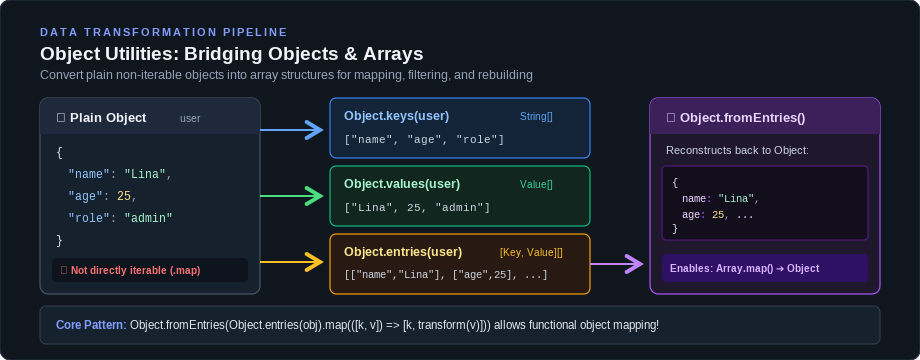
1. Core Method Breakdown
Object.keys() — Get Property Names
Returns an array containing all enumerable own property names as strings.
- When to use: Counting properties (
Object.keys(user).length), checking key existence, looping over keys.
Object.values() — Get Property Values
Returns an array containing all own enumerable property values.
- When to use: Aggregating totals, validating values, checking with
includes().
Object.entries() — Key + Value Pairs
Returns an array of [key, value] pairs. This unlocks the entire JavaScript Array toolkit (map, filter, reduce) for objects!
Object.fromEntries() — Rebuild an Object
The reverse operation of Object.entries(). Accepts an iterable of [key, value] pairs and reconstructs a brand-new object.
const user = {
  name: "Lina",
  age: 25,
  role: "admin"
};

// 1. Object.keys() -> Array of property names
console.log(Object.keys(user));
// ["name", "age", "role"]

// 2. Object.values() -> Array of property values
console.log(Object.values(user));
// ["Lina", 25, "admin"]

// 3. Object.entries() -> Array of [key, value] pairs
console.log(Object.entries(user));
// [["name", "Lina"], ["age", 25], ["role", "admin"]]

// 4. Object.fromEntries() -> Turns key/value entries back into an object
const entries = [["name", "Lina"], ["age", 25]];
console.log(Object.fromEntries(entries));
// { name: "Lina", age: 25 }Real-World Pattern: Functional Object Transformation
Because objects cannot be mapped directly, the industry standard pattern is: $$\text{Object} \longrightarrow \text{Object.entries()} \longrightarrow \text{.map() / .filter()} \longrightarrow \text{Object.fromEntries()} \longrightarrow \text{New Object}$$
const prices = {
  apple: 1,
  banana: 2,
  orange: 3
};

// Transform object values using entries -> map -> fromEntries
const doubledPrices = Object.fromEntries(
  Object.entries(prices).map(([fruit, price]) => [fruit, price * 2])
);

console.log(doubledPrices);
// Output: { apple: 2, banana: 4, orange: 6 }

// Filter object properties by value
const expensive = Object.fromEntries(
  Object.entries(doubledPrices).filter(([_, price]) => price > 3)
);

console.log(expensive);
// Output: { banana: 4, orange: 6 }Method | Input | Output Format | Return Type | Primary Use Case |
|---|---|---|---|---|
Object.keys(obj) | Object | Array of property names | string[] | Looping keys, checking key existence, counting properties (.length) |
Object.values(obj) | Object | Array of property values | any[] | Aggregating values (summing, averaging), checking .includes() |
Object.entries(obj) | Object | Array of [key, value] tuples | [string, any][] | Destructuring in for...of, mapping/filtering object data with array methods |
Object.fromEntries(entries) | Iterable of [k, v] pairs | Reconstructed plain object | Object | Converting transformed entries back to an object, Map/URLSearchParams conversion |
Think it throughInterview Question: How do you turn a URL query string or FormData into a clean JavaScript object?
Use Object.fromEntries()!
// 1. From URLSearchParams:
const params = new URLSearchParams('?category=books&page=2');
const query = Object.fromEntries(params);
// { category: "books", page: "2" }

// 2. From HTML FormData:
const form = document.querySelector('form');
const data = Object.fromEntries(new FormData(form));
// { username: "Lina", email: "lina@example.com" }
Because URLSearchParams and FormData implement iterable entry pairs [key, value], Object.fromEntries() turns them into a plain JavaScript object in a single line.