Modern browsers provide client-side storage mechanisms to save data directly on the user's device without a database. Understanding how localStorage, sessionStorage, and Cookies differ in capacity, lifetime, and network behavior is a staple of front-end technical interviews.
All Web Storage systems store data as key/value string pairs only.
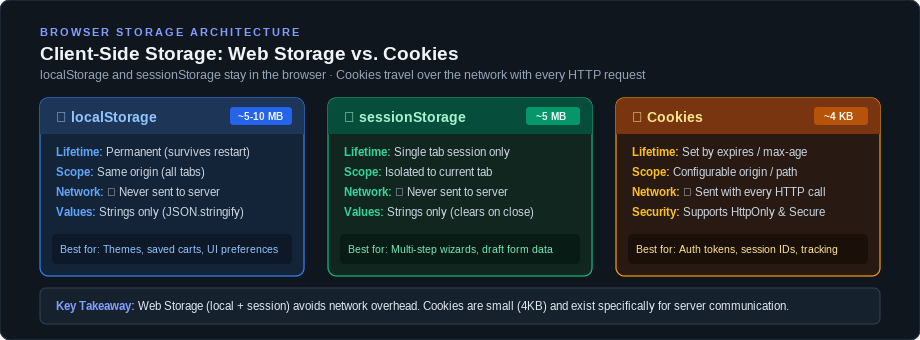
1. localStorage
Part of the Browser Object Model (BOM), localStorage persists data with no expiration time. The data remains even after restarting the browser or computer.
- Scope: Shared across all tabs and windows under the same origin (
protocol://domain:port). - Best for: User UI theme (dark/light mode), saved shopping carts, offline cached data.
// 1. Store data (strings only)
localStorage.setItem("username", "Omar");
localStorage.setItem("theme", JSON.stringify({ mode: "dark" }));

// 2. Retrieve data
const user = localStorage.getItem("username"); // "Omar"
const theme = JSON.parse(localStorage.getItem("theme") || "{}");

// 3. Remove specific key
localStorage.removeItem("username");

// 4. Wipe all stored data for this origin
localStorage.clear();2. sessionStorage
sessionStorage shares the exact same API methods as localStorage, with one critical distinction:
- Tab Lifetime: Data is stored only for the duration of the current page session. Closing the tab or window wipes the data completely.
- Isolated Scope: Opening the same URL in a new tab creates a separate, independent session.
- Best for: Multi-step checkout wizards, temporary draft inputs, one-time session flags.
// Stored only for the lifetime of this specific browser tab
sessionStorage.setItem("draftTitle", "Interview Notes");

console.log(sessionStorage.getItem("draftTitle")); // "Interview Notes"

sessionStorage.removeItem("draftTitle");
sessionStorage.clear(); // Clears current tab storage3. Cookies
Cookies are small pieces of text (max 4KB) stored in the browser and automatically sent to the server with every HTTP request.
Key Attributes
expires=DATEormax-age=SECONDS: Sets expiration time (defaults to session cookie if omitted).path=/: Restricts which URL paths send the cookie.secure: Ensures transmission only over HTTPS connections.HttpOnly: Prevents JavaScript from reading the cookie, defending against XSS attacks.
// 1. Create a cookie with attributes
document.cookie = "username=Omar; max-age=3600; path=/; secure";

// 2. Read cookies (document.cookie returns all key=value pairs)
function getCookie(name) {
  const match = document.cookie
    .split("; ")
    .find(row => row.startsWith(name + "="));
  return match ? match.split("=")[1] : null;
}
console.log(getCookie("username")); // "Omar"

// 3. Delete a cookie (set expiration to a past date)
document.cookie = "username=; expires=Thu, 01 Jan 1970 00:00:00 UTC; path=/;";Feature | localStorage | sessionStorage | Cookies |
|---|---|---|---|
Storage Limit | ~5MB - 10MB per origin | ~5MB per tab | ~4KB per cookie |
Lifetime | Persistent until explicitly deleted | Expires on tab/window close | Set by expires / max-age (or session) |
Sent with HTTP? | No (client-side only) | No (client-side only) | Yes (automatically with every request) |
Tab Scope | Shared across all tabs (same origin) | Isolated to current tab | Shared across all tabs (same origin/path) |
Primary Purpose | Theme preference, offline caches, shopping cart | Multi-step form wizard, single-tab temp state | Auth session IDs, JWTs (HttpOnly), tracking |
Think it throughInterview Question: Why shouldn't you store sensitive authentication tokens in localStorage?
localStorage is fully accessible to any client-side JavaScript code. If your web app has a Cross-Site Scripting (XSS) vulnerability, an attacker's injected script can run localStorage.getItem('token') and steal user sessions.
Storing authentication tokens in HttpOnly, Secure Cookies ensures the browser sends the token automatically with requests while completely hiding it from JavaScript, preventing XSS token theft.