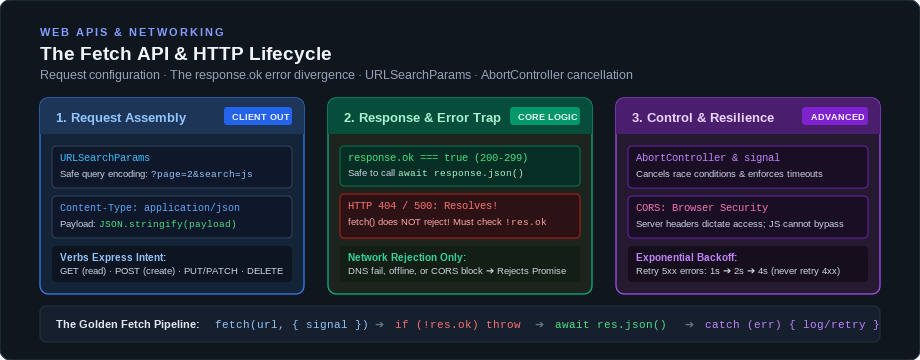
When JavaScript communicates with backend servers across the network, it relies on the Hypertext Transfer Protocol (HTTP). While early JavaScript relied on cumbersome XMLHttpRequest objects, modern browsers provide the native Fetch API—a Promise-based, non-blocking interface for network communication.
However, because network programming introduces latency, unreliable connections, security boundaries, and concurrency edge cases, using fetch() requires an exact understanding of HTTP semantics, response streaming, and browser constraints:
$$\text{fetch(url, options)} \longrightarrow \text{Network Transport} \longrightarrow \text{Response Object (Stream)}$$
1. HTTP Fundamentals: Verbs, Status Codes & Headers
Every HTTP network request carries four structural elements:
- HTTP Methods (Verbs): Express the client's intent:
GET: Retrieve data. Must be safe (does not mutate server state) and has no request body.POST: Submit new data to create a resource on the server.PUT: Replace an entire existing resource with the provided representation.PATCH: Partially update specific fields of an existing resource.DELETE: Remove the specified resource.
- Status Code Families:
2xx(Success):200 OK(standard success),201 Created(resource created via POST),204 No Content(success with empty body).4xx(Client Errors):400 Bad Request(invalid payload),401 Unauthorized(missing/invalid token),403 Forbidden(token lacks permission),404 Not Found(invalid URL/ID),429 Too Many Requests(rate limited).5xx(Server Errors):500 Internal Server Error,502 Bad Gateway,503 Service Unavailable.
- Request vs. Response Headers:
- Request headers describe what the client is sending (
Content-Type: application/json), expecting (Accept: application/json), or presenting for identity (Authorization: Bearer <token>). - Response headers describe what the server returned (
Content-Type,Cache-Control).
- Request headers describe what the client is sending (
2. URL & URLSearchParams: Query Strings Done Right
Constructing query strings via string concatenation ("/api/users?search=" + term) is fragile: spaces break URLs, special characters like & or # corrupt parameters, and encoding is easily missed.
The native URL and URLSearchParams Web APIs solve this by handling encoding and manipulation automatically:
// 1. Building query strings safely with URL and URLSearchParams
const url = new URL("/api/products", "https://store.example.com");

url.searchParams.set("search", "mechanical keyboard");
url.searchParams.set("page", 2);
url.searchParams.set("limit", 20);

// Automatically encodes spaces to '+' or '%20' safely
console.log(url.toString());
// "https://store.example.com/api/products?search=mechanical+keyboard&page=2&limit=20"

// 2. Reading query parameters from the current URL
const params = new URLSearchParams(window.location.search);
const currentSearch = params.get("search"); // "mechanical keyboard"
const hasPage = params.has("page"); // true3. Handling Fetch Responses & The #1 Trap
When calling fetch(), remember the most common misconception in frontend engineering:
Network Errors vs. HTTP Errors
- Network Errors (Fetch Rejects): The browser cannot reach the server (user is offline, DNS resolution failed, connection timed out, or CORS blocked the response).
fetch()rejects and jumps tocatch. - HTTP Errors (Fetch Resolves): The server received the request and returned
404 Not Foundor500 Internal Server Error. Because communication succeeded, the Promise fulfills normally.
To detect HTTP failures, you must inspect response.ok (a boolean that is true only for status codes 200–299).
async function loadUserData(userId) {
  try {
    const res = await fetch(`/api/users/${userId}`);

    // TRAP: fetch does NOT throw on 404 or 500! Must check res.ok manually:
    if (!res.ok) {
      throw new Error(`HTTP Error: ${res.status} ${res.statusText}`);
    }

    // Body stream can only be read once; res.json() returns a Promise
    if (res.status === 204) return null; // Safe handling for 204 No Content
    const data = await res.json();
    return data;
  } catch (err) {
    console.error("Fetch pipeline failed:", err.message);
    throw err;
  }
}4. Sending Data to APIs: POST, PUT & JSON Payloads
To send data via fetch(), pass an options configuration object as the second argument:
method: The HTTP verb ("POST","PUT","PATCH","DELETE"). Defaults to"GET".headers: Specify"Content-Type": "application/json"so the backend body parser recognizes the payload format.body: Must be a stringified representation (e.g.JSON.stringify(payload)), not a raw JavaScript object.
async function createStudent(student) {
  const res = await fetch("/api/students", {
    method: "POST",
    headers: {
      "Content-Type": "application/json",
      "Accept": "application/json",
      "Authorization": "Bearer secret_jwt_token_123"
    },
    // Body must be a serialized JSON string, NOT a plain object
    body: JSON.stringify(student),
    credentials: "same-origin"
  });

  if (!res.ok) {
    const errorBody = await res.json().catch(() => ({}));
    throw new Error(errorBody.message || `Creation failed: ${res.status}`);
  }

  return await res.json();
}5. CORS: The Same-Origin Policy & Browser Security
The Same-Origin Policy (SOP) is a foundational browser security rule: by default, a web page at https://app.com cannot read data returned from https://api.domain.com unless both share identical protocol, domain, and port.
Why CORS Errors Happen
Cross-Origin Resource Sharing (CORS) is a mechanism where the target server sends response headers declaring allowed origins (e.g., Access-Control-Allow-Origin: https://app.com).
- CORS is enforced by the browser, not the server: The server often receives and processes the request; however, if the response lacks valid CORS headers, the browser blocks client JavaScript from reading it.
- Why Postman works: Tools like Postman or curl are backend HTTP clients that do not enforce the browser Same-Origin Policy.
- You cannot "fix" CORS in client JavaScript: Adding headers in
fetch()will not bypass CORS. The server must send the appropriateAccess-Control-*headers, or you must route requests through a same-origin reverse proxy.
6. AbortController: Cancellation & Request Timeouts
In real applications, network operations should not run unchecked. If a user types into an autocomplete search box, older in-flight requests might resolve after newer requests, causing outdated results to overwrite the UI (a race condition).
The native AbortController Web API provides a clean mechanism to cancel pending requests:
// Request cancellation & timeout pattern with AbortController
async function fetchWithTimeout(url, timeoutMs = 5000) {
  const controller = new AbortController();
  const timer = setTimeout(() => controller.abort(), timeoutMs);

  try {
    const res = await fetch(url, { signal: controller.signal });
    if (!res.ok) throw new Error(`HTTP ${res.status}`);
    return await res.json();
  } catch (err) {
    if (err.name === "AbortError") {
      console.warn(`Request timed out or cancelled after ${timeoutMs}ms`);
    }
    throw err;
  } finally {
    clearTimeout(timer); // Prevent timer leak if fetch settles quickly
  }
}7. Production Architecture: Service Layers & Exponential Backoff
In scalable web applications, fetch() calls should never be scattered across UI components. Instead, structure your network code with:
- API Service Layers: Centralized modules exposing clean domain functions (
getUser(),updateBilling()) while hiding network implementation details. - Pagination Strategy:
- Page / Limit (
?page=2&limit=20): Simple for static tables and admin dashboards, but fragile if rows are added or deleted while paginating. - Cursor-based (
?cursor=xyz&limit=20): Provides stable ordering without skipped items; standard for infinite scroll and real-time activity feeds.
- Page / Limit (
- Exponential Backoff: When network drops or temporary
5xxserver glitches occur, retry requests by doubling the wait time (1s ➔ 2s ➔ 4s). Never retry 4xx client errors (such as 400 or 404), as they represent permanent client mistakes.
// Production-grade resilient API wrapper with Exponential Backoff
async function apiFetch(url, options = {}, retries = 3, delay = 1000) {
  try {
    const res = await fetch(url, options);

    // 4xx errors are client mistakes (do NOT retry 400, 401, 404)
    if (!res.ok) {
      if (res.status >= 500 && retries > 0) {
        throw new Error(`Server ${res.status}`); // trigger retry catch block
      }
      throw new Error(`Client request failed with status: ${res.status}`);
    }

    return res.status === 204 ? null : await res.json();
  } catch (err) {
    // Only retry on network errors or 5xx server issues
    if (retries > 0 && !err.message.includes("Client request failed")) {
      console.warn(`Retrying ${url} in ${delay}ms... (${retries} retries left)`);
      await new Promise(r => setTimeout(r, delay));
      return apiFetch(url, options, retries - 1, delay * 2); // Exponential backoff
    }
    throw err;
  }
}Method | Idempotent? | Has Body? | Primary Purpose | Typical Success Status |
|---|---|---|---|---|
GET | Yes (Safe) | No | Read resources without modifying server state | 200 OK |
POST | No | Yes | Create a new resource or process an action | 201 Created / 200 OK |
PUT | Yes | Yes | Completely replace an existing resource | 200 OK / 204 No Content |
PATCH | No | Yes | Partially update specified fields of a resource | 200 OK |
DELETE | Yes | Rarely | Remove a specified resource from the server | 204 No Content / 200 OK |
Think it throughActivity 1: Why does this code print 'Success' when querying a non-existent route (HTTP 404)?
try {
  const res = await fetch("/api/non-existent-endpoint");
  console.log("Success:", res.status);
} catch (err) {
  console.error("Error caught:", err.message);
}
Output: Success: 404
Why?
Because fetch() only rejects the Promise on network transport failures (e.g., DNS failure, offline client). Receiving an HTTP status code (even 404 or 500) means the HTTP exchange successfully completed!
Fix:
Check if (!res.ok) throw new Error("HTTP " + res.status); inside the try block.
Think it throughActivity 2: How do you prevent race conditions when a user rapidly types in a live search input?
Store a reference to an active AbortController and abort the previous request before launching a new one:
let searchController = null;

async function onSearchInput(query) {
  // 1. Cancel any in-flight request from previous keystrokes
  if (searchController) {
    searchController.abort();
  }
  searchController = new AbortController();

  try {
    const url = new URL("/api/search", window.location.origin);
    url.searchParams.set("q", query);

    const res = await fetch(url, { signal: searchController.signal });
    if (!res.ok) throw new Error("Search failed");
    const results = await res.json();
    renderSearchResults(results);
  } catch (err) {
    // Ignore aborted requests—they are intentional cancellations
    if (err.name !== "AbortError") {
      console.error("Real search error:", err);
    }
  }
}