Errors are a natural and necessary part of software engineering. Rather than viewing them as accidents, professional JavaScript developers treat errors as signals—deliberate guardrails that enforce business rules, protect program state from corruption, and enable fail-fast architecture.
Mastering JavaScript error handling requires understanding:
- Built-in Error Taxonomy (
TypeError,ReferenceError,URIError, etc.) - The Error Object & Stack Propagation (
name,message,stack) - Custom Error Classes (
class ValidationError extends Error) - Defensive Function Design (Validations vs. Errors)
- Async Error Handling (
Promises&async/await)
1. Built-In JavaScript Error Types
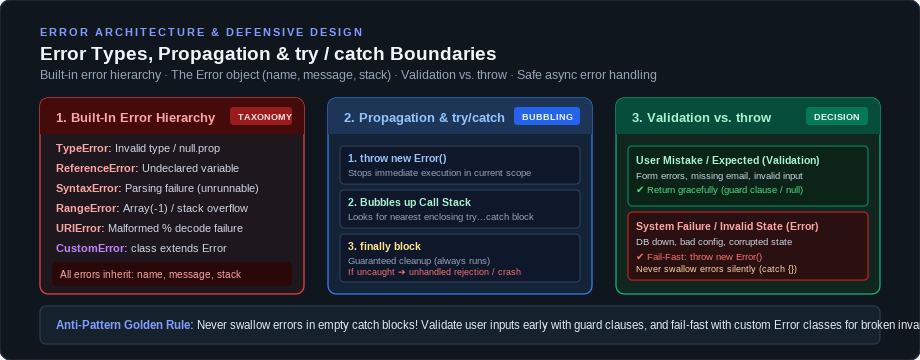
JavaScript provides built-in error constructors that inherit from the base Error object. Using the correct error type provides immediate semantic clarity:
TypeError: Occurs when a value is not of the expected type or when invoking a non-function (user.toUpperCase(),null.name).ReferenceError: Occurs when reading a variable that has not been declared or is in the Temporal Dead Zone (TDZ).SyntaxError: Occurs at compile/parse time when code violates language grammar rules (code cannot execute at all).RangeError: Occurs when a numeric value is outside legal bounds (e.g.new Array(-1)or infinite recursion stack overflow).URIError: Occurs whenencodeURI()ordecodeURIComponent()receives malformed percent-encoding (%without two hex digits).
// 1. TypeError - wrong data type or invoking non-function
let num = 5;
// num(); // ❌ TypeError: num is not a function

// 2. ReferenceError - accessing non-existent variable
// console.log(unknownVar); // ❌ ReferenceError: unknownVar is not defined

// 3. SyntaxError - invalid language grammar (fails at parse-time)
// if (true { } // ❌ SyntaxError: Unexpected token '{'

// 4. RangeError - value outside legal bounds
// new Array(-1); // ❌ RangeError: Invalid array length

// 5. URIError - malformed percent-encoding
// decodeURIComponent("%"); // ❌ URIError: URI malformed
console.log(decodeURIComponent("%20")); // ✔ Output: " " (Valid hex 0x20)2. The try...catch...finally Construct
The try/catch statement intercepts runtime exceptions, preventing unhandled crashes.
The finally Guarantee
The finally block always executes, regardless of whether the try block succeeded, caught an error, or returned early. It is the premier location for cleanup tasks (closing database connections, stopping loading spinners, releasing locks).
function parseUserData(jsonString) {
  try {
    console.log("1. Attempting JSON parse...");
    const data = JSON.parse(jsonString);
    return data;
  } catch (err) {
    console.log("2. Caught error:", err.name, "-", err.message);
    return null; // Graceful fallback
  } finally {
    console.log("3. Cleanup complete (finally always runs!)");
  }
}

parseUserData("{ invalid json }");
// Output:
// 1. Attempting JSON parse...
// 2. Caught error: SyntaxError - Unexpected token...
// 3. Cleanup complete (finally always runs!)3. The Error Object & Stack Propagation
Every JavaScript error object contains three core properties:
name: The error class name ("TypeError","ValidationError").message: Human-readable description explaining what failed.stack: The execution trace detailing the exact chain of function calls leading to the throw.
Error Propagation (Bubbling)
When an error is thrown, it bubbles up the call stack until intercepted by the nearest enclosing try/catch. If no handler exists up to the global execution context, the program terminates with an unhandled exception.
4. Custom Error Classes for Domain Architecture
Generic errors like throw new Error("Bad request") lack semantic context. Production applications extend the base Error class to create domain-specific error types that can be caught conditionally using instanceof:
// Professional Custom Error Classes extending Error
class ValidationError extends Error {
  constructor(message, field) {
    super(message); // Preserves native V8 stack trace
    this.name = "ValidationError";
    this.field = field;
  }
}

class AuthError extends Error {
  constructor(message) {
    super(message);
    this.name = "AuthError";
  }
}

// Layered handling using instanceof
function processLogin(email, password) {
  if (!email.includes("@")) {
    throw new ValidationError("Invalid email format", "email");
  }
  if (password !== "secret") {
    throw new AuthError("Invalid credentials");
  }
  return "Login successful";
}

try {
  processLogin("bad-email", "secret");
} catch (err) {
  if (err instanceof ValidationError) {
    console.log(`Validation failed on [${err.field}]:`, err.message);
  } else if (err instanceof AuthError) {
    console.log("Redirect to login:", err.message);
  } else {
    throw err; // Re-throw unknown errors!
  }
}5. Defensive Design: Validations vs. Errors
A critical architectural distinction is knowing when to validate versus when to throw:
- Input Validation (Preventive): For expected user mistakes (missing form inputs, bad formats). Use guard clauses and return graceful error messages or fallback states.
- Fail-Fast Errors (Exceptional): For violated invariants, corrupted state, or impossible conditions. Throw immediately so bad data never propagates deeper into the system.
6. Async Error Handling: Promises & async/await
Errors in asynchronous code require special care:
- In Promises: Throwing inside an executor automatically rejects the Promise. Always attach
.catch()to handle rejections. - In async/await: An unhandled rejected Promise is unwrapped by
awaitinto a standard thrown exception, which can be cleanly caught withtry/catch.
// 1. Promises: Throwing inside an executor rejects the promise
const riskyPromise = new Promise(() => {
  throw new Error("Network timeout"); // Same as calling reject()
});

riskyPromise.catch(err => console.log("Promise caught:", err.message));

// 2. async / await: await unwraps rejections into thrown exceptions
async function fetchDashboard() {
  try {
    const response = await fetch("/api/dashboard");
    if (!response.ok) {
      throw new Error(`Server returned ${response.status}`);
    }
    return await response.json();
  } catch (err) {
    console.error("Dashboard fetch failed:", err.message);
    throw err; // Re-throw to caller after logging
  }
}Error Type | Root Cause | Trigger Example | Phase |
|---|---|---|---|
SyntaxError | Code violates language grammar rules | if (true { } | Compile / Parse Phase |
ReferenceError | Accessing variable not declared in scope | console.log(unknown) | Runtime Execution |
TypeError | Invoking non-function or reading null/undefined | null.name or (5)() | Runtime Execution |
RangeError | Number or array size outside allowable bounds | new Array(-1) | Runtime Execution |
URIError | Malformed percent-encoding in URI encode/decode | decodeURI('%') | Runtime Execution |
Error (Base) | General-purpose or custom application exception | throw new Error('boom') | Runtime Execution |
Think it throughActivity 1: Where is this error caught, and what does the stack trace reveal?
function leaf() { throw new Error('Crash!'); }
function middle() { leaf(); }
function root() {
  try { middle(); }
  catch (e) { console.log('Caught at root:', e.message); }
}
root();
Output: Caught at root: Crash!
Explanation:
Because leaf and middle do not have try/catch blocks, the error bubbles up the call stack until it reaches root. The stack property will record leaf -> middle -> root, showing the exact path of propagation.
Think it throughActivity 2: The finally return trap — What does this print?
function test() {
  try {
    return 1;
  } finally {
    return 2;
  }
}
console.log(test());
Output: 2
Why?
The finally block is guaranteed to run before the function exits. When a finally block contains an explicit return (or throw), it overrides and discards any pending return value from the try block!